




epinormal
sebasmidi
xan2622

JessikaRabbitt

Dawnspire
asilaydyingdl

Genedon
aznsmartj0ck

IanITAInc

mazodude
PeterRollar

murdock83
Collection
Favourites












- May 12
- Bulgaria
- Deviant for 14 years
- He / Him
Badges

My Bio
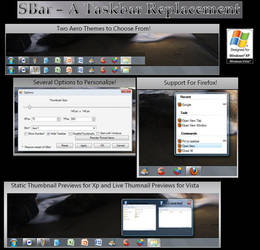
I am a normal man that works a programmer in a east Europe country. I like making software for fun and basically software for extending windows.
A Bug-Fix release
0 min read
New version 1.061 is available!
This a bug-fix release!
1. {fixed} When Open option dialog on Vista exception is shown
2. {fixed} When manual reposition SBar ShowDesktop button go to wrong position
3. {fixed} Sometimes when hover button or when start application Button image do not refresh
4. Other fixes
For now Know bugs are:
- On some machines there a crash with unhandled exception (when use transformation packs or modified system files)
- When Taskbar is set to Autohide there is a problem with initial positioning of SBar
- some windows are missing if you start SBar after that windows are showed
IMPORTANT! Due to the database chan
Join the community to add your comment. Already a deviant? Log In
New version!
0 min read
New version is OUT!(1.060)
This is generally bug-fix release!
In this release are made many bug fixes as follows:
1. {[new]}Added support for MSN Messenger
2. {[new]}Added partial support for Windows Media Player
3. {[fixed]}Pin items from recent list for Firefox not working
4. {[fixed]}On startup if there is windows open the taskbar buttons graphics not load
5. Other bugfixes
For now Know bugs are:
- On some machines there a crash with unhandled exception
- When Taskbar is set to Autohide there is a problem with initial positioning of SBar
- in some situations manual position of SBar don't work properly
- some windows are missing
Join the community to add your comment. Already a deviant? Log In
Fixing Sbar recent bugs....
0 min read
Now i am trying to fix Sbar recent bugs like:
1. still show Sbar even if Full screen app is started
2. not button frame when new app is started until mouse hover even is fired
3. some slow down on fast minimize - restore- maximaze operations
For now i think i was fix 1. and 3. About 2. ummm stil i have not confirmation in all situations will work!
Meanwhile i was add support for Windows Live messenger and partial support for Windows Media player.
Join the community to add your comment. Already a deviant? Log In
Profile Comments 22
Join the community to add your comment. Already a deviant? Log In
Happy birthday Dimitar!

Merry christmas and a happy new year!


Happy birthday Dimitar!
Hey,
I'm using your sbar program and I have a question.
My taskbar is not located on the bottom of the screen, but rather, I place it at the top. So I can't see the thumbnail previews. I can only see them when I move my taskbar to the bottom of the screen. Is there a way so that the preview will drop down instead of popping up so I can keep the taskbar on top? Also, how do I change the size of the icons?
Thanks.
I'm using your sbar program and I have a question.
My taskbar is not located on the bottom of the screen, but rather, I place it at the top. So I can't see the thumbnail previews. I can only see them when I move my taskbar to the bottom of the screen. Is there a way so that the preview will drop down instead of popping up so I can keep the taskbar on top? Also, how do I change the size of the icons?
Thanks.
![[link]](https://www.deviantart.com/users/outgoing?http://i42.tinypic.com/fp2dmf.jpg)
Later i will make a super preview of it!
![[link]](https://www.deviantart.com/users/outgoing?http://i29.tinypic.com/2iscz1c.jpg)